


How to Spoof Pokémon GO on iPhone
Spoofing your location in Pokémon GO on iPhone can help you catch rare Pokémon, explore different in-game regions, and complete location-based tasks without physically being there. Whether you want to catch region-specific Pokémon or participate in distant events, spoofing can provide a fun way to enhance your gaming experience. However, it's important to note that spoofing violates Pokémon GO’s terms of service, and overuse may result in your account being banned.
In this article, we’ll walk you through the best ways to spoof Pokémon GO on your iPhone, along with some important things to consider before you start.
- Contents:
- Why Spoof Pokémon GO on iPhone?
- Method 1. Using Cocosenor Locationgo (Recommended Method)
- Method 2. Using a Jailbreak (Advanced Method)
- Method 3. Using a VPN (For IP Spoofing)
- FAQs on How to Spoof Pokémon GO on iPhone
Why Spoof Pokémon GO on iPhone?
Here are a few reasons why players choose to spoof Pokémon GO:
- Access Region-Locked Pokémon: Some Pokémon are only available in specific locations. Spoofing your location allows you to access them from anywhere.
- Catch Rare Pokémon: Rare Pokémon might appear in certain regions or during specific in-game events. Spoofing helps you get access to these Pokémon without having to travel.
- Complete Tasks Faster: Many Pokémon GO tasks and events require you to be in different geographic locations. Spoofing makes completing these tasks easier and quicker.
- Convenience: You can bypass the need to physically go to certain places to collect items, participate in gym battles, or visit PokéStops.
There are several methods to spoof your GPS location on iPhone. Below are the most popular and effective ones.
Method 1. Using Cocosenor Locationgo (Recommended Method)
Cocosenor Locationgo is one of the most reliable location-spoofing apps for iPhone, allowing you to change your GPS location with ease. It’s an easy-to-use tool that requires no jailbreak and can be used without worrying about triggering bans (if used correctly).
Features of Pokémon GO Spoofer for iOS
- 1. No need to jailbreak your iPhone.
- 2. Easy-to-use interface and installation process.
- 3. Works for all apps that rely on GPS, not just Pokémon GO.
How to Use Cocosenor Locationgo to Spoof Pokémon GO on iPhone:
Step 1:Download Locationgo on your computer (macOS or Windows). Install the software by following the on-screen instructions.
Step 2: Plug your iPhone into your computer via a USB cable.
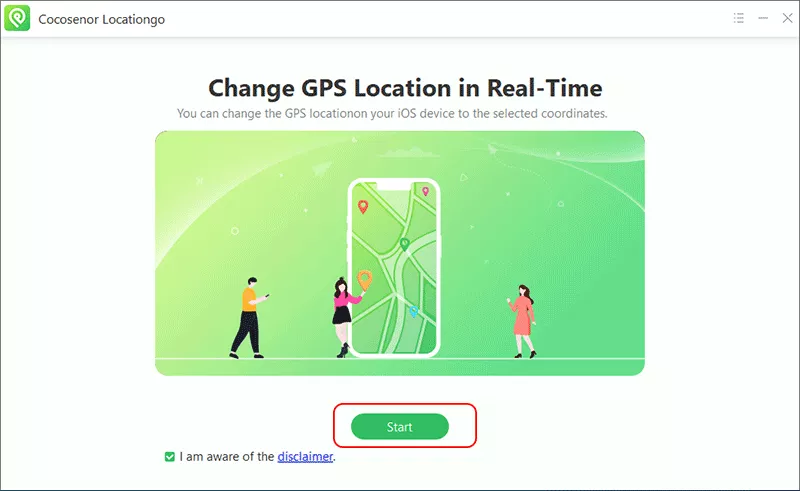
Step 3: Open Locationgo and hit the Start button.
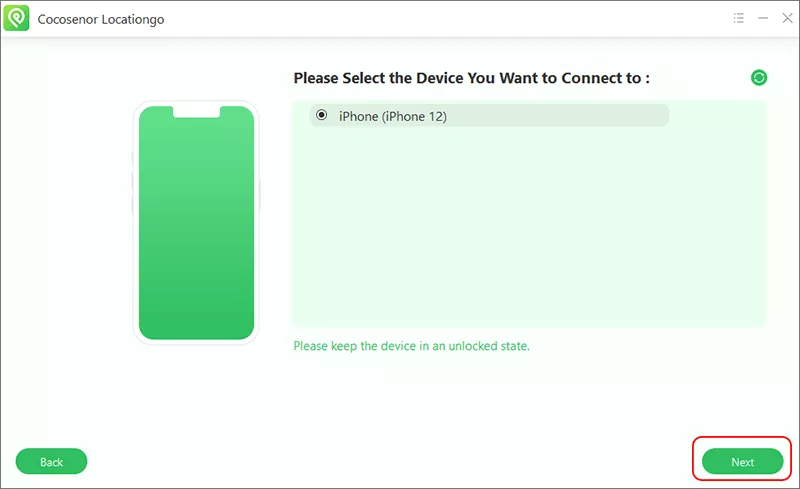
Step 4: Make sure your iPhone is connected and it is detected by the software. Select it and hit the Next button to continue.
Step 5: Select the spoofing mode you want for Pokemon GO. Just take Single-Spot mode as example. Choose the Single-Spot mode on the top right corner.
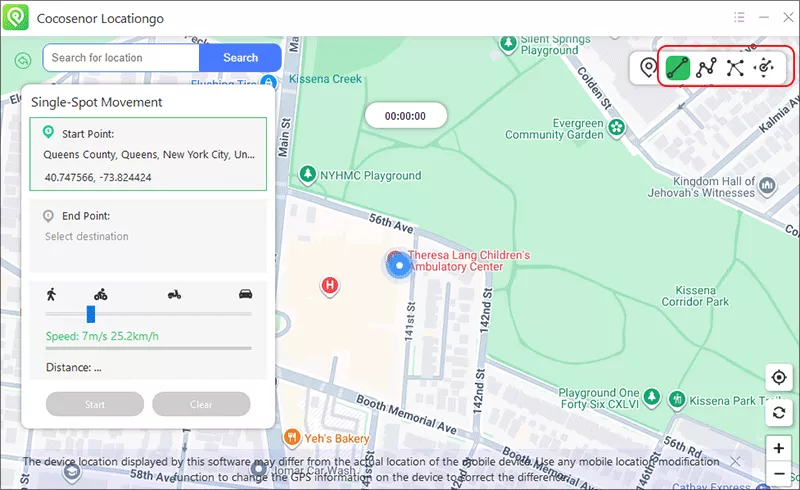
Step 6: Use the map to search for a specific location or use the search bar to find your destination (for example, a rare Pokémon’s region).
Step 7: After selecting your location, click the Start button. Your iPhone will now think you're in the new location.

Once the location is spoofed, open the Pokémon GO app, and it should show your new location, allowing you to catch Pokémon and visit PokéStops in that area to complete tasks that require you to be in a specific location.
Method 2. Using a Jailbreak (Advanced Method)
If you’re comfortable with jailbreaking your iPhone, this method gives you more control over your device and access to third-party apps for GPS spoofing. Jailbreaking allows you to install apps like iSpoofer or LocationHolic, which can modify your iPhone’s location directly.
Step 1: Jailbreak Your iPhone by following the steps in this guide.
Step 2: After jailbreaking, open Cydia (the app store for jailbroken devices) and search for iSpoofer or LocationHolic.
Step 3: After installing the location spoofer, launch it and set your desired fake location on the map.
Step 4: Open the Pokémon GO app, and your device will display the new, spoofed location.
This method gives you full control over the GPS location, but the game will still be able to detect changes. You’ll be able to travel to places virtually without moving.
Method 3. Using a VPN (For IP Spoofing)
A VPN (Virtual Private Network) changes your device’s IP address, making it appears as though you’re in another country. While a VPN can help you spoof your location for apps that use IP-based location detection (like for accessing region-locked content), it does not affect your GPS location for Pokémon GO.
Step 1: Install a reliable VPN service, such as ExpressVPN, NordVPN, or CyberGhost, on your iPhone.
Step 2: Choose a server in the region where you want to appear, such as Japan, Europe, or the USA.
Step 3: After connecting to the VPN, open Pokémon GO. The VPN will change your IP, but your GPS location will remain the same unless you also use a GPS spoofing app.
The VPN will mask your real IP address, but it won’t spoof your actual GPS location for Pokémon GO. You might be able to access region-specific content, but it won’t help you with the GPS-dependent aspects of the game.
FAQs on How to Spoof Pokémon GO on iPhone
1. Is spoofing Pokémon GO on iPhone safe?
NSpoofing Pokémon GO is against the game’s Terms of Service, and Niantic (the game’s developer) can detect suspicious activity. If caught, you risk a temporary or permanent ban. Use spoofing tools cautiously, and avoid excessive or unusual location changes to minimize the risk.
2. Can I spoof Pokémon GO without jailbreaking my iPhone?
Yes, you can spoof Pokémon GO without jailbreaking your iPhone by using location-spoofing apps like Cocosenor Locationgo. These apps do not require jailbreaking and are much safer than jailbreaking your device.
3. How to change my location in Pokémon GO?
You can use the above methods to spoof the location for the Pokémon GO game. If you want the free way, you need to jailbreak iPhone and choose iSpoofer to spoof Pokémon GO without computer.
Conclusion
Spoofing Pokémon GO on your iPhone can be an exciting way to catch rare Pokémon, access different regions, and complete in-game tasks faster. While there are several methods to spoof your location, always proceed with caution. Using tools like Cocosenor Locationgo is a safer, non-invasive way to spoof your location, while jailbreaking provides full control but comes with risks.



