Products Backup Tuner
Cocosenor Backup Tuner backup tuner box

The Windows System/Partition/Disk Cloning Software

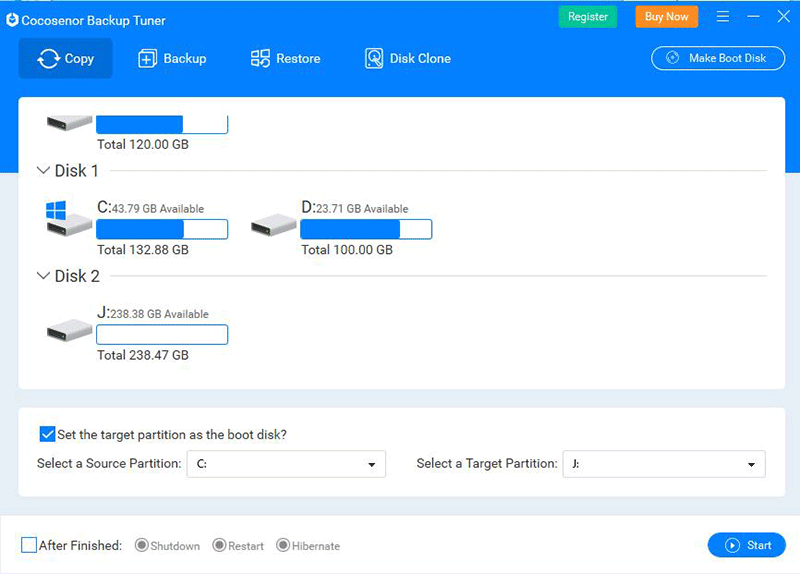
Backup Tuner is an easy-to-use system and partition backup software which can help users to copy, backup and restore an entire partition, even the whole Windows operation system. You can also clone disk to another HDD/SSD. It is absolutely a quick and safe way to backup your data.

  • Copy Windows operation system to another new drive without reinstallation.
  • Backup and restore the whole partition/disk data in an effective way.
  • Move Windows OS to a Solid-State Drive with ease.
  • Complete disk to disk clone in the safe mode.
  • Duplicate the same Windows system to another drive.
for windowsSystem Requirements

Windows 11 , 10 , 8.1 , 8 , 7 , Vista , XP , 2000  ;  Windows Server 2025 , 2022 , 2019 , 2016 , 2012 , 2008 , 2003

money back guarantee

Key Features

  • Clone Windows 11/10/8.1/8/7/Vista/XP/2000 operation system to a new drive.
  • Backup and restore the whole Windows operation system or partition.
  • Transfer the same Windows system to different computers with no reinstallation.
  • Set Computer to shutdown, restart, or hibernate after the copy/backup/restore process.
  • Clone hard disk to another HDD/SSD with no data loss.
  • Simple and easy to use with intuitive using interface.
  • Stop the clone process at any time.
  • Free technical support and new version upgrade.

Step by step guide

  • Step1: Download and run Backup Tuner on your computer.
  • Step2: Click the Copy button in the user interface.
  • Step3: Select the source target- the system disk or partition to copy.
  • Step4: Select a destination target and click the Start button.
  • More

FAQ

Related Resources

Reviews

user

My external drive is cloned successfully to another disk. The disk-to-disk option is amazing.

Assessment level:
  • --by Jonathan Miles
  • 03/15/2026
user

The backup speed was reasonable considering the amount of files I had. Good experience overall.

Assessment level:
  • --by Leo Zhang
  • 12/30/2025
user

I used it before replacing my SSD and it helped me avoid losing important files. The overall process felt simple.


Assessment level:
  • --by Emily R.
  • 10/09/2025