


How to Play Pokémon GO Without Moving

Pokémon GO has been a revolutionary game in the mobile gaming world, encouraging players to get outside, walk, and explore their surroundings. But can you play Pokémon GO without moving? Absolutely! In this guide, we'll show you how to play Pokémon GO without walking, whether you're using an iOS or Android device. By simulating movement or using location spoofing tools, you can catch Pokémon, visit PokéStops, and complete challenges without ever leaving your couch.
- Contents:
- Can You Play Pokémon GO Without Walking?
- How to Play Pokémon GO Without Moving on iOS
- How to Play Pokémon GO Without Moving on Android
- FAQs on Playing Pokémon GO Without Moving
Can You Play Pokémon GO Without Walking?
Yes, you can play Pokémon GO without walking! While the game encourages players to physically walk around to catch Pokémon and explore the world, there are several ways to simulate movement in the game. These methods allow you to experience the game and catch Pokémon without the need to move.
Now, let’s dive into how you can play Pokémon GO without moving, starting with methods for both iOS and Android devices.
How to Play Pokémon GO Without Moving on iOS
If you're using an iPhone or another iOS device, there are several tools you can use to play Pokémon GO without walking.
Option 1. Using Cocosenor Locationgo
Cocosenor Locationgo is one of the best and safest apps to change your GPS location on iPhone without jailbreaking the device. This tool allows you to simulate walking in the game without ever leaving your home.
How to Play Pokémon GO Without Moving on iOS Using Cocosenor Locationgo:
Step 1: Download and install Cocosenor Locationgo on your Windows or macOS computer. After that, link your iPhone to the computer.
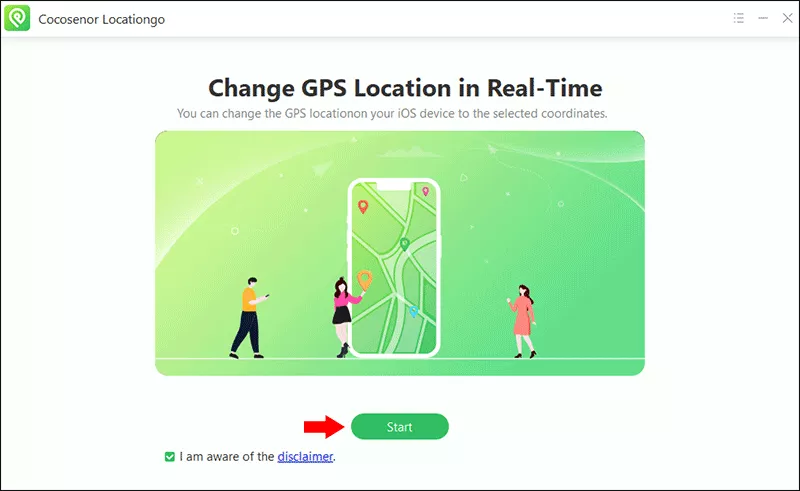
Step 2: Run the software and click the Start button on the center of the home interface.
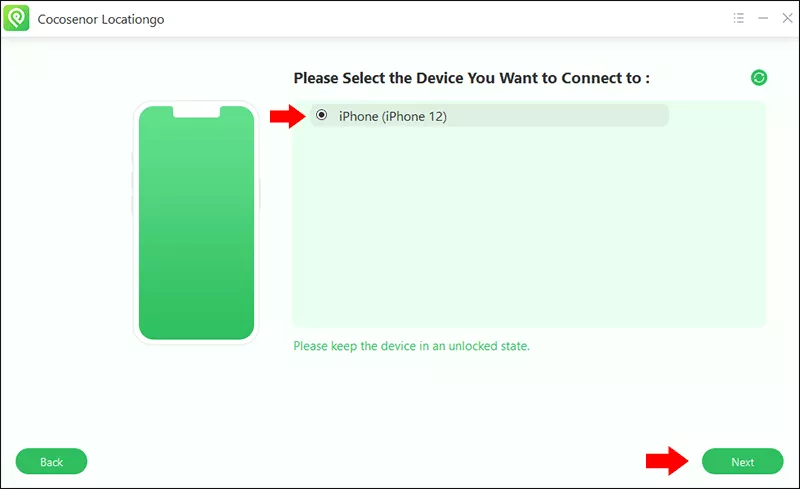
Step 3: Select your iPhone from the list and hit the Next button on the lower right corner.
Step 4: In no time, you can see a Map. There are four modes on the top right corner for you to change the iPhone location. Here, Multi-Spot mode is set as an example. Just select Multi-Spot mode to move ahead.

Step 5: Set the route mode, waypoints and move speed.

Step 6: Click the Start button and confirm the movement. After that, your iPhone’s GPS will be changed to the new location.

Option 2. Using a Virtual Joystick (For Movement Simulation)
Another method to play Pokémon GO without moving on iOS is by using a virtual joystick. Apps like iSpoofer (now discontinued but previously available) allowed iOS users to simulate movement in the game using a joystick control. Currently, there are fewer reliable joystick apps for iOS since Apple does not officially support location spoofing, but third-party apps can still provide this feature.
How to Play Pokémon GO Without Moving on Android
For Android users, there are more flexible options for playing Pokémon GO without moving. Location spoofing apps are easier to access on Android, and they allow you to simulate movement with ease.
Option 1. Using Fake GPS Location
Fake GPS Location is a popular app for Android users who want to spoof their location and play Pokémon GO without walking.
Step 1: Install Fake GPS Location from the Google Play Store.
Step 2: Access Settings > About phone > tap on Build number seven times to enable Developer Options.
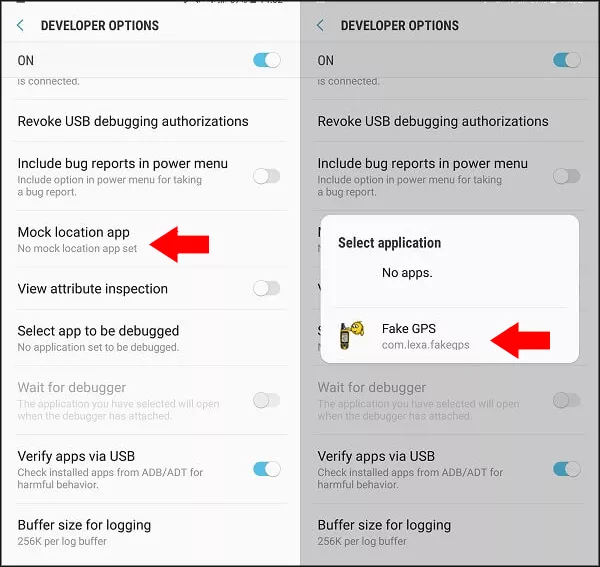
Step 3: In Developer Options, tap Mock location app. Then select Fake GPS as the mock location app.
Step 4: Run the Fake GPS Location app and pick a new location from the map.
After selecting your desired location, launch Pokémon GO. Your character will now be in that location, and you can play without moving.

Option 2. Using PGSharp
PGSharp is a popular app for Android that provides a joystick feature to simulate walking in Pokémon GO. It allows you to move in the game using virtual controls without actually walking.
Step 1: Download PGSharp from its official website and install it on your Android phone.
Step 2: Open PGSharp and log into your Pokémon GO account.
Step 3: Use the virtual joystick to simulate movement within the game, walking to PokéStops, gyms, and catching Pokémon.
Step 4: Use the joystick to move around the game world without walking in real life.

FAQs on Playing Pokémon GO Without Moving
1. Is it possible to play Pokémon GO without moving?
Yes, by using location spoofing tools or virtual joysticks, you can play Pokémon GO without walking. These methods simulate movement or teleport you to different locations in the game.
2. Can I play Pokémon GO from home without walking?
Absolutely! Tools like Cocosenor Locationgo and Fake GPS Location (Android) allow you to simulate being in different locations without stepping outside.
3. Is using a joystick to play Pokémon GO safe?
Using a joystick can be risky if you overuse it. Niantic may flag your account if it detects unusual movement patterns or teleporting, which could result in a temporary or permanent ban.
4. Can I teleport to different regions in Pokémon GO without walking?
Yes, tools like Cocosenor Locationgo and Fake GPS Location allow you to teleport to different regions within the game, allowing you to catch region-specific Pokémon without moving.
Conclusion
Playing Pokémon GO without moving is possible through location spoofing and joystick apps for both iOS and Android devices. These methods allow you to enjoy the game from home and still interact with the world of Pokémon GO by simulating movement. However, it's important to use these methods responsibly, as excessive spoofing or movement simulation can lead to account bans.



