


How to Change iPhone Location Without Jailbreak

Is it possible to change iPhone location to anywhere with no jailbreak? Yes, you can use reliable third-party tools or apps that allow you to spoof your location without modifying your iPhone’s operating system. These tools simulate a new GPS location while keeping your device’s integrity intact.
Thus, you can easily access region-specific content, play location-based games like Pokémon GO, or enhance your privacy. In this guide, we’ll walk you through the safest methods for changing your iPhone's location without jailbreaking your device, using trusted tools and software.
- Contents:
- How to Change Location on iPhone with Laptop
- How to Change GPS location on iPhone without Computer
- FAQs on iPhone Location Changing
How to Change Location on iPhone with Laptop
There are several ways to change your iPhone’s location safely without jailbreaking. Below, we cover some of the most popular methods that are widely used and trusted.
Method 1: Use Cocosenor Locationgo
Cocosenor Locationgo is a powerful, user-friendly tool that allows you to change your iPhone's GPS location without jailbreaking. It works for iOS 26 and earlier versions, and you don’t need to worry about voiding your warranty or exposing your device to risks. This iPhone location changer is trusted by thousands of satisfied users.
Step 1: Get the software installed on your Windows or Mac computer. Besides, connect your iPhone to the computer using a USB cable and enable developer mode on your iPhone.
Step 2: Launch the Locationgo software and hit the Start button to change your GPS coordinates.
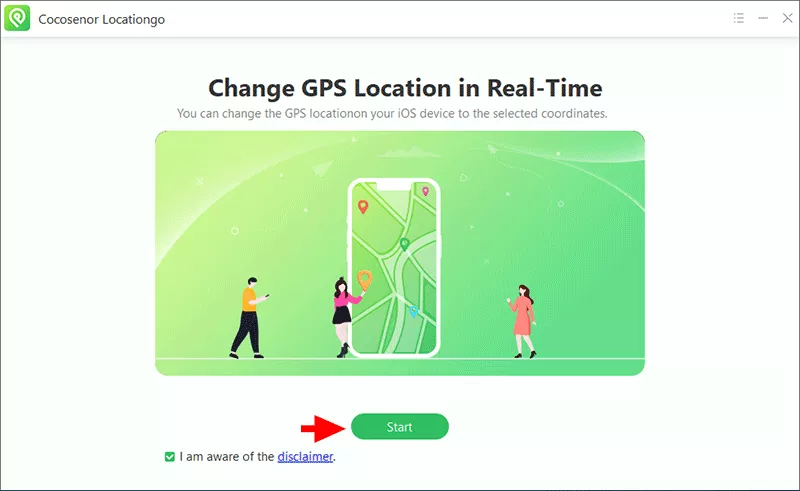
Step 3: Select your connected iPhone and click the Next button to proceed.

Step 4: In no time, the Map appears. You can utilize the Map or search bar to enter the location where you want to go. After setting your new location, click the Modify button. Soon, your iPhone location will be updated.

Method 2: Use iTools
iTools is the all-in-one solution developed by ThinkSky, which can help iOS users to deal with data transfer issue. It also enables users to fake the iPhone location within clicks. But it has the limitation in iOS versions and iPhone models.
Step 1: Install this software on your computer and make the iPhone connected.
Step 2: Run the software and click “Home”. After that, choose Virtual Location option from the home screen.

Step 3: Enter your desired location in the textbox and click the Go button.
Step 4: A box appears on the top of your new location. Then click “Move here” to change the iPhone location.

How to Change GPS location on iPhone without Computer
If you want to change the iPhone GPS location without laptop/computer, the VPN is a good choice. A VPN can hide your IP address and make it appear as though you are in a different location, which makes it possible to access content or events that are restricted to certain regions.
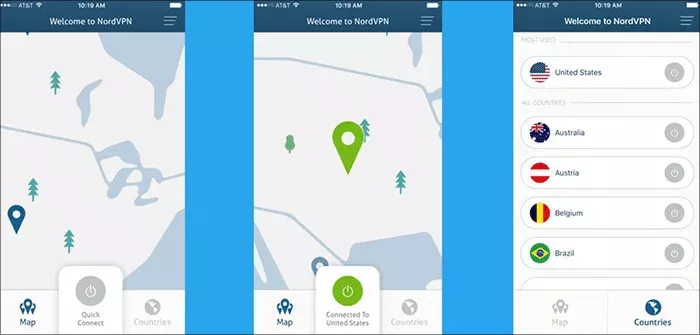
Step 1: Install a trusted VPN on your iPhone. Here, NordVPN is set as an example.
Step 2: Open the VPN and create a new account. Then sign in the account.
Step 3: Select the country or region you want your device to appear to be in and connect it. Once connected, your IP address will reflect the new server location, allowing you to access region-specific content.
FAQs on iPhone Location Changing
1. How can you change your location on iPhone?
You can change your iPhone’s location without jailbreaking using third-party tools like Cocosenor Locationgo, which can spoof your GPS location safely and securely.
2. How to change location on iPhone App Store?
You can unlock your iPhone, access Settings> Your Apple ID profile> Media and Purchase >View Account > Sign in with your Apple ID password. After that, tap Country/Region > Change Country/Region to change iPhone location to another country or region.
3. How do I change my location on iPhone for Pokémon GO?
You can use Cocosenor Locationgo to spoof your location for Pokémon GO. After changing your location, your iPhone will appear to be in the new region, allowing you to catch Pokémon from different areas.
Conclusion
Changing your iPhone’s location without jailbreaking is possible and safe using trusted tools like Cocosenor Locationgo. This tool can help you spoof your location without any risk of damaging your device. Always use location spoofing tools responsibly to avoid issues with apps like Pokémon GO and enjoy the freedom to explore new virtual worlds!



