


How to Jailbreak iOS 26 without Computer
Apple's iOS 26 is the most visually redesigned iPhone operating system in years — and naturally, the jailbreak community is already hard at work trying to unlock it. Whether you want to install custom tweaks, sideload apps, or simply push your device beyond Apple's walled garden, this guide covers everything you need to know about jailbreaking iOS 26: what tools exist, which ones actually work, what the risks are, and how to do it step by step.
- How to Jailbreak iOS 26: Everything You Need to Know
- What Is Jailbreaking, and Why Do People Do It?
- Is It Possible to Jailbreak iOS 26?
- Before You Start: Essential Preparations
- Method 1: Jailbreak iOS 26 with XIXtract
- Method 2: Misaka26 — Feature Unlocking Without a Full Jailbreak
- Risks and Realities of Jailbreaking
- FAQs on iOS 26 Jailbreak
What Is Jailbreaking, and Why Do People Do It?
Jailbreaking is the process of exploiting a privilege escalation vulnerability in iOS to remove Apple's software restrictions. Once jailbroken, your iPhone or iPad gains root-level access — meaning you can install apps from outside the App Store, apply system-wide themes, run automation scripts, enable features Apple has hidden, and customize the device in ways that simply aren't possible on stock iOS.
People jailbreak for many reasons:
- 1. Customization — Change fonts, icons, animations, and UI layouts beyond Apple's defaults
- 2. App freedom — Install apps Apple has rejected or that exist only in third-party repositories
- 3. Tweaks and extensions — Modify the behavior of built-in apps like Messages, Safari, or the Camera
- 4. Privacy and control — Run ad blockers at the system level, monitor network traffic, disable telemetry
- 5. Developer and security research — Inspect app behavior, test exploits, or study iOS internals
Is It Possible to Jailbreak iOS 26?
iOS 26 launched with Apple's most aggressive kernel hardening to date, and the exploit landscape is still catching up. The public jailbreak for iOS 26 does not yet exist. All popular jailbreak tools online do not support iOS 26.
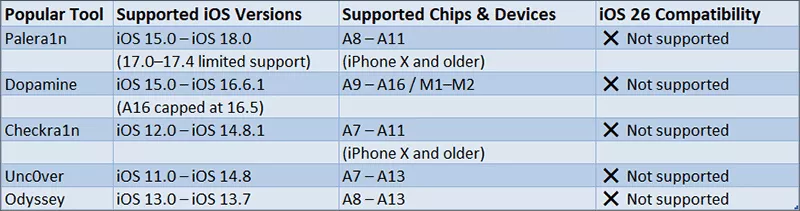
What does exist are several "jailbreak-adjacent" tools — app-layer customization platforms that don't provide true root access but can install third-party apps, repos, and basic tweaks without a computer. These are worth knowing about, with the caveat that they are not real jailbreaks.
Before You Start: Essential Preparations
Regardless of which method you use, these steps are non-negotiable before attempting any jailbreak or customization tool:
1. Back Up Your Device
Create a full backup via iCloud (Settings > [Your Name] > iCloud > iCloud Backup > Back Up Now) or via Finder/iTunes on a Mac or PC. If anything goes wrong, you'll be able to restore your data.
2. Check Your iOS Version
Some tools are version-specific. Go to Settings > General > About > iOS Version and note it down. Avoid updating to newer iOS 26-point releases until you've confirmed jailbreak compatibility, since Apple continuously patches exploits.
3. Save Your SHSH Blobs
SHSH blobs are cryptographic certificates that allow you to restore your device to a specific iOS version later, even if Apple stops signing it. Tools like TSSSaver (tsssaver.1conan.com) can save your blobs automatically while your current version is still being signed by Apple.
Method 1: Jailbreak iOS 26 with XIXtract
XIXtract is currently the most widely discussed option for iOS 26 with no PC. It works by installing a mobile configuration profile through Safari, which allows it to bypass the App Store and serve third-party apps and repositories. It does not touch the iOS kernel [not a true jailbreak], so it won't provide root access or support system-level tweaks — but for many casual users, it's enough.
What XIXtract can do:
- • Install third-party apps not available on the App Store
- • Apply home screen themes and icon packs
- • Access jailbreak-adjacent repos with custom tools
- • All done directly from your iPhone, no Mac or PC required
Step 1: Open Safari on your iPhone or iPad (other browsers will not work), and navigate to xixtract.com.
Step 2: Tap the Install button on the page. When iOS prompts you about a downloaded profile, go to Settings > General >VPN & Device Management and tap the profile, then tap Install and enter your device passcode to get it installed on your device.
Step 3: Return to your home screen and open the XIXtract app.
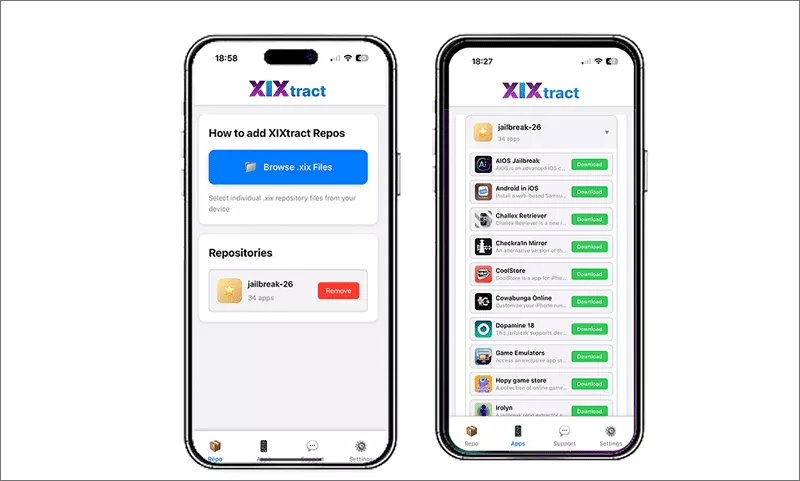
Step 4: Go to the Repos tab and tap Browse .xix Files to add a repository. After that, you can browse available apps and tweaks and install what you need.
Important: Only install profiles and repos from sources you trust. Configuration profiles can grant significant access to your device. Malicious profiles have been used to steal data in the past.
Method 2: Misaka26 — Feature Unlocking Without a Full Jailbreak
Misaka26 is not a jailbreak, but it's worth mentioning separately. It uses the MobileGestalt exploit to unlock hidden iOS features on devices that don't officially support them — things like Dynamic Island on older iPhones, Stage Manager on non-Pro iPads, Always-On Display, and Apple Intelligence features. It's compatible with both Windows and macOS.
Note:
Support for iOS 26.0 and 26.1. It was removed after Apple patched the MobileGestalt exploit in iOS 26.2 beta 2, so check current compatibility before using.
Risks and Realities of Jailbreaking
No jailbreak guide is complete without a frank discussion of the downsides:
Security: Jailbreaking disables iOS’s app sandbox. Unverified tweaks may contain malware; only use trusted repos and developers.
Stability: Tweak conflicts trigger crashes or boot loops. Rootless jailbreaks are more stable than old rootful ones as they leave core system files untouched.
Updates: New iOS builds patch exploit loopholes. Updating erases jailbreak access and may seal exploits forever; disable auto-updates.
Warranty: Jailbreaking violates Apple’s terms. Apple will deny service for jailbroken devices, but full factory restores clears jailbreak traces.《、
Data loss: Jailbreaking rarely wipes data, yet failures may occur. Always back up your device beforehand.
FAQs on iOS 26 Jailbreak
Q1: Will jailbreaking delete my data?
Not directly. The jailbreak process preserves your data, but errors during the process can require a full restore, which will erase the device. Back up first, always.
Q2: Can I unjailbreak my iPhone?
Yes. A full factory restore via Finder (Mac) or iTunes (Windows) will remove all traces of a jailbreak and restore stock iOS.
Q3: Does jailbreaking unlock my iPhone for other carriers?
No. Jailbreaking and carrier unlocking are entirely separate processes. Carrier unlocking must be done through your carrier or a legitimate unlocking service.
Conclusion
Can you jailbreak iOS 26 now? Yes, you can have a try by using the XIXtract tool, which is listed in this article with details. But before you go ahead, pay attention to your iOS data. It is highly to back up your iPhone data before jailbreaking it. Good luck!



