


How to Change Location on Tinder iPhone
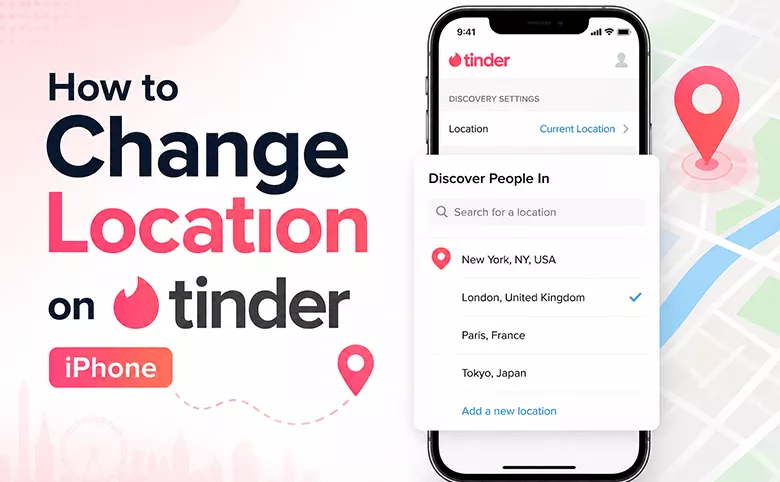
Tinder matches you with people nearby — which sounds great until you realize "nearby" is the only option you have. Whether you're planning a trip, tired of seeing the same faces, or simply want to protect your privacy, knowing how to change your Tinder location can completely transform your experience on the app.
In this guide, we'll walk through every method available: from Tinder's own paid feature to a reliable iPhone location changer that works without moving.
- Contents:
- Why Change Your Tinder Location?
- Method 1: Apply Tinder Passport Mode (Official, But Paid)
- Method 2: Change Tinder Location on iPhone Without Premium
- Method 3: Change Tinder Location Without Moving — Simulate a Route
- Method 4: Choose Tinder Location Changer App
- FAQs on Changing Tinder Location
Why Change Your Tinder Location?
Before diving into the methods, it's worth understanding the real reasons people look for this:
- Travel prep — Meet potential dates in a city before you even arrive.
- Relocation — Explore your future neighborhood's dating scene while still at home.
- Exhausted local pool — Small towns have limited options. Expanding your radius is the logical move.
- Privacy — Sharing your exact GPS position with strangers has obvious risks. A virtual location adds a layer of protection.
- Curiosity — Sometimes you just want to see what dating looks like in Tokyo or Barcelona.
Method 1: Apply Tinder Passport Mode (Official, But Paid)
The only built-in way to change your Tinder location without physically moving is Tinder Passport — a feature exclusive to Tinder Plus, Tinder Gold, and Tinder Platinum subscribers. In other words, you need to pay for the premium plan for location modification.
Step-by-step Guide to Use Tinder Passport Mode:
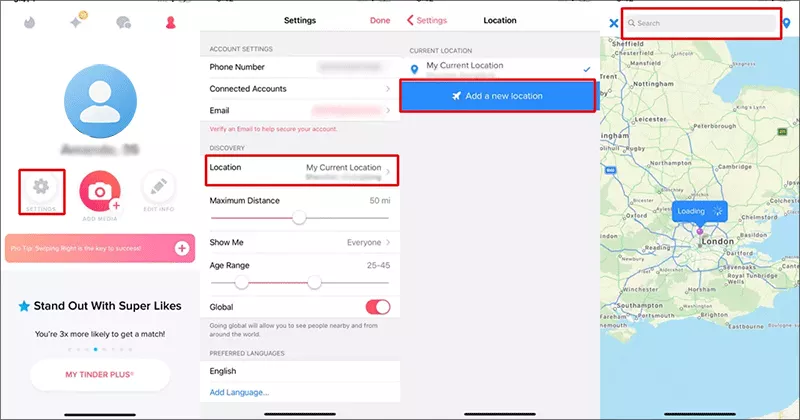
Step 1: Open Tinder and tap your Profile icon. Tap the gear icon to open Settings.
Step 2: Scroll to Location under Discovery Settings and choose it. Then tap Add a new location.
Step 3: Search for a city or drop a pin anywhere on the map. Confirm the selection and start swiping. You can switch locations as often as you like, and Tinder even saves your recent locations for quick access.
Note:
Tinder Passport requires a paid subscription. And now Tinder no longer lists fixed prices publicly — the cost varies based on your age, location, and device. You may have to purchase a full membership package simply to use a single location-related feature.
If you only want to change your location without paying for unlimited likes, boosts, or other extras you'll never use — there's a smarter way. Just go ahead.
Method 2: Change Tinder Location on iPhone Without Premium
If you want to change your Tinder location on iPhone without Tinder Passport, the most reliable solution is a dedicated GPS location changer app that spoofs your GPS directly at the system level.
Cocosenor Locationgo is one of the cleanest options available. It works from your Windows or Mac computer, connects to your iPhone via USB, and lets you set any GPS coordinates in the world — no jailbreak required.
Why GPS spoofing works on Tinder? Tinder determines your location primarily through your device's GPS. When Locationgo changes the GPS signal your iPhone reports, Tinder reads that as your real position. From the app's perspective, you have simply moved.
Steps to Change Tinder Location with Locationgo:
Step 1: Get Cocosenor Locationgo on your computer and make your iPhone connected to it. Don’t forget to close all location-based apps in advance.
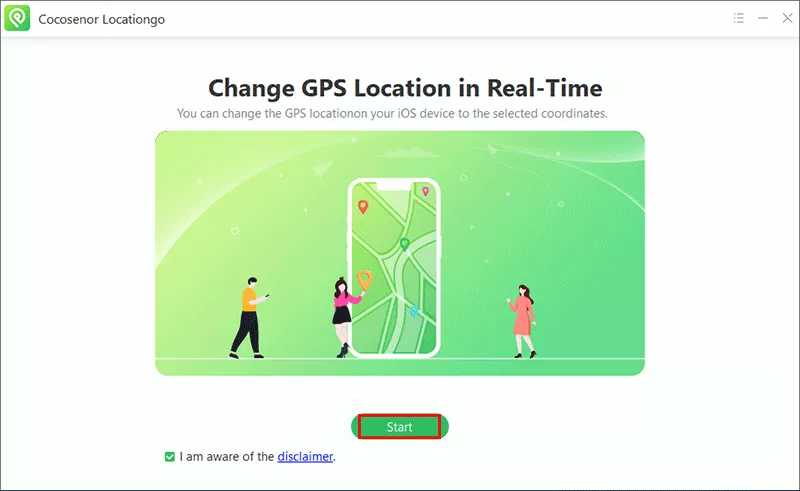
Step 2: Open Locationgo and click Start to proceed.
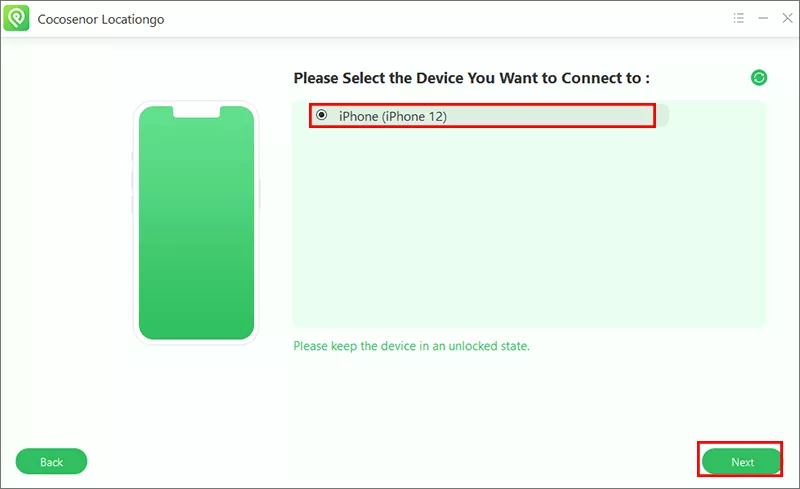
Step 3: Select your device from the list and click the Next button.
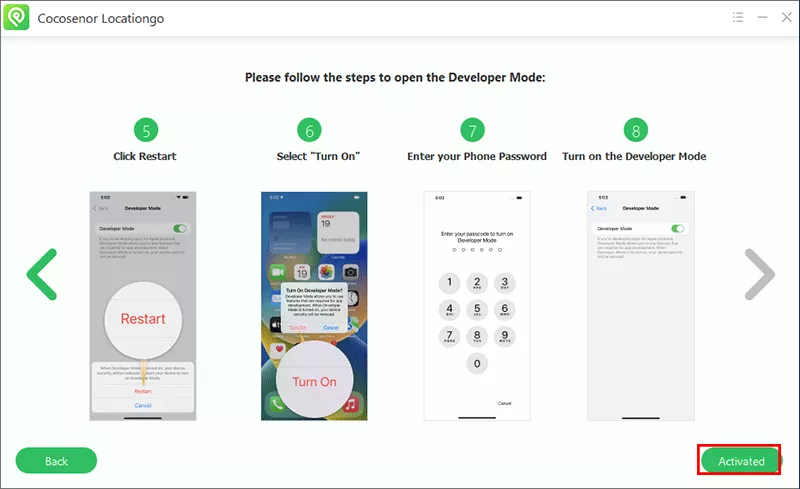
Step 4: Follow the onscreen instructions to open iPhone developer mode.
Step 5: Search for any city or pick a location from the map as your new location. After that, hit the Modify button and confirm it. Then your iPhone GPS will update instantly.
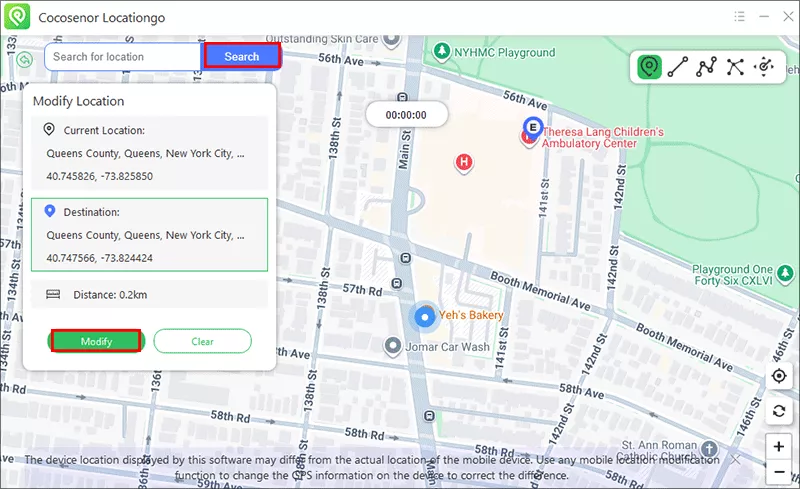
After that, open Tinder, and your location now reflect the new city. The whole process is with no subscription and no jailbreak. How easy it is!
Method 3: Change Tinder Location Without Moving — Simulate a Route
To avoid algorithmic detection, it is wise to adjust your Tinder location gradually. Accounts with unexplained long-distance location changes are likely to be flagged.
Cocosenor Locationgo solves this with its GPS movement simulation feature. Instead of teleporting instantly, you can:
- Define a custom walking or driving route between two points.
- Set a realistic speed (walking pace, cycling speed, etc.).
- Let the app simulate gradual movement along that route.
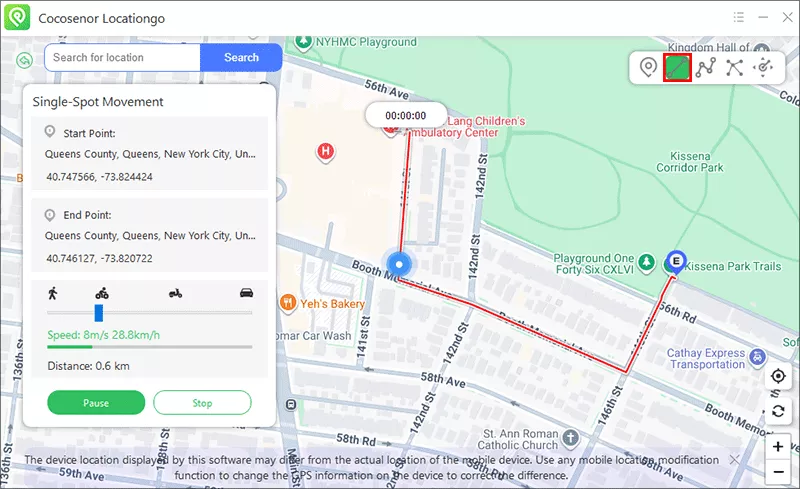
If you wish to establish a realistic presence in a new city thousands of miles aways instead of an instant location shift, this method is highly effective.
Method 4: Choose Tinder Location Changer App
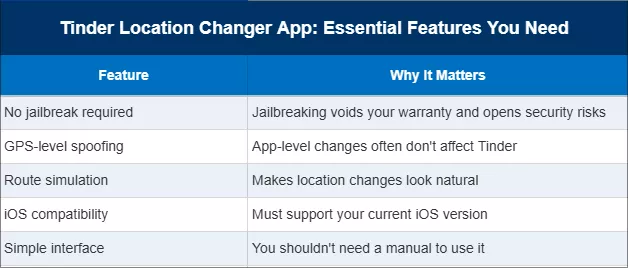
If you're searching for a "Tinder location changer app," you'll find dozens of options. Not all of them work reliably on iPhone. Here's what actually matters below. You can choose such an app and change the Tinder location on your iPhone.
FAQs on Changing Tinder Location
Q1: Can I change my Tinder location for free?
No. Tinder's own feature — Tinder Passport requires a paid plan. tools like Cocosenor Locationgo offer a free download, but still needs the one lifetime purchase to apply the location change.
Q2: Does a VPN change my Tinder location?
A VPN changes your IP address, but not your GPS location. Since Tinder primarily uses GPS on mobile devices, a VPN alone will not change where Tinder thinks you are. You need a GPS spoofer, not a VPN.
Q3: Tinder Passport not working, what to do?
First of all, make sure you are the Tinder Plus, Gold or Platinum member. Then, close and retry the Passport feature. After that, you can find the Tinder Passport alternative, such as Cocosenor Locationgo, to change the Tinder location.
Final Thoughts
Changing your Tinder location doesn't have to mean paying for a full premium subscription you don't need. If your goal is simply to swipe in a different city — whether for an upcoming trip, a fresh start, or a broader dating pool — a dedicated iPhone location changer gives you more control at a lower cost.
Cocosenor Locationgo is available for both Windows and Mac, supports all modern iPhones and iPads, and requires no jailbreak. The easy setup means you can have your Tinder location changed in minutes.



