


How to Change Location on OkCupid
Want to meet people in another city or browse matches while traveling? OkCupid allows users to update their location directly from profile settings. You can also use GPS-changing tools if you want to appear in a different place on the app. This guide explains all the working methods for changing your location on OkCupid.
- Contents:
- Can You Change Your Location on OkCupid?
- Method 1: Change Location Directly in the OkCupid App
- Method 2: Change Location on OkCupid Website
- Method 3: Use a GPS Location Changer
- Why OkCupid Location Sometimes Won’t Change
- Tips for Changing Location Successfully
- FAQs on Changing Location on OkCupid
Can You Change Your Location on OkCupid?
Yes. OkCupid lets users manually edit their profile location on both the mobile app and website. According to OkCupid’s official support page, you can update your listed location anytime through profile settings.
However, OkCupid may still use GPS location, IP address, and Device location services, especially in the Discover section.
Method 1: Change Location Directly in the OkCupid App
This is the easiest and safest method. OkCupid states that users can type another location manually from the profile editor. For iPhone users, you can check the below steps.
Step 1: Open the OkCupid app. Tap your profile picture.
Step 2: Tap the edit (pen) icon and find the Location section.
Step 3: Enter a new city or location. Finally, save your changes.
Method 2: Change Location on OkCupid Website
Using the web version gives more flexibility for manual location changes.
Step 1: Visit OkCupid Official Website and log into your account.
Step 2: Open Settings and locate listed location.
Step 3: Type your desired city or ZIP code. Then, save the changes.
Method 3: Use a GPS Location Changer
If OkCupid continues detecting your real GPS location, you may need a virtual location tool to change location in dating apps. These apps work especially well for iPhone users because iOS does not support mock GPS natively. Here, Cocosenor Locationgo is used as the GPS location changer to help iPhone users change the GPS location. But you need a laptop to finish the process.
Step 1: Download and install Cocosenor Locationgo on your computer.
Step 2: Connect your iPhone to the computer via USB.
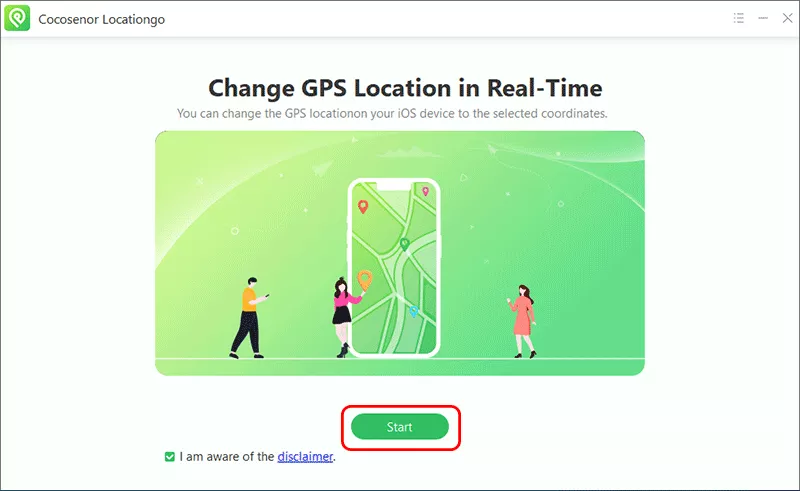
Step 3: Open Locationgo and click the Start button. After that, select your iPhone from the list and hit the Next button.
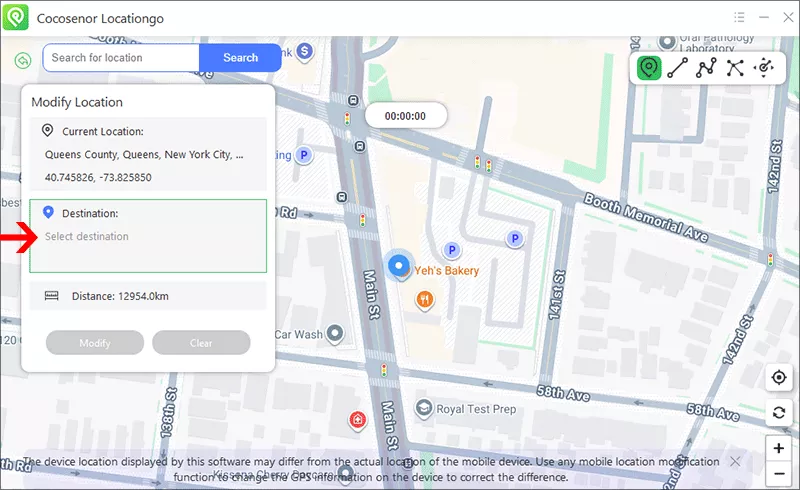
Step 4: A map appears and now you can select the desired location you want to show on OkCupid.
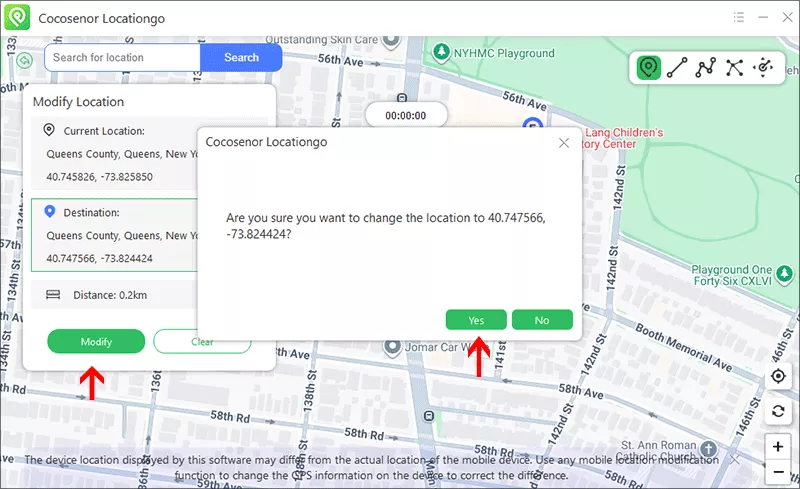
Step 5: Finally, click the Modify button to apply the new location.
Minutes later, you can open OkCupid on your iPhone and your profile may now appear in the selected area.
Why OkCupid Location Sometimes Won’t Change
Some users report that OkCupid still shows nearby matches even after updating profile location. This happens because the app may combine GPS signals, IP address, device location permissions, and browser location services. OkCupid officially notes that Discover uses your phone’s current location to show nearby people.
In this situation, you can enable Location Permissions to fix the issue.
For iPhone users, open Settings >Privacy & Security> Location Services, then enable location access for OkCupid.
Tips for Changing Location Successfully
In order to successfully change your location in the dating app OkCupid, you can:
- 1. Restart OkCupid after changing location
- 2. Clear app cache
- 3. Disable Wi-Fi scanning
- 4. Use realistic locations
- 5. Avoid switching countries too frequently
FAQs on Changing Location on OkCupid
1. Can I change my OkCupid location for free?
Yes. OkCupid allows manual location editing for free through profile settings.
2. Does OkCupid use GPS or profile location?
Both. The app may use: your listed profile location, device GPS, and browser location permissions, especially for Discover recommendations.
3. Can I match with people from another country?
Yes. You can manually set another location or use location-changing tools to browse different regions.
Final Thoughts
Changing your location on OkCupid is relatively simple. You can either update your profile location directly through settings or use GPS spoofing tools for more advanced location control. Whether you’re traveling, moving soon, or just exploring matches in another city, changing your OkCupid location can help you discover more potential connections worldwide.



