


How to Change Location on Bumble
Platforms like Bumble use your phone’s GPS to show potential matches nearby. This helps users connect with people who are physically close to them. However, there are situations where you may want to view matches in another city or country. Whether you’re planning a trip or moving soon, Bumble offers a feature that allows you to change your visible location.
In this guide, you’ll learn how to change your location on Bumble, how the feature works, and tips to make the most of it.
- Content:
- How Bumble Location Works
- Why People Change Their Location on Bumble
- How to Manually Change Location on Bumble
- How to Change iPhone Location to Adjust Bumble Location
- FAQs on Bumble Location
How Bumble Location Works
By default, Bumble uses your device’s GPS to determine where you are. When you open the app, it checks your phone’s location through your operating system such as Android or iOS.
Once your location is detected, the app shows profiles based on distance from your current position. Users closest to you typically appear first in the swipe queue.
Your location will automatically update when: You travel to another area; your phone GPS detects movement; you reopen the app in a new location. Because of this system, you usually see matches within a specific distance range.
Why People Change Their Location on Bumble
Many users change their location for practical reasons.
Planning Travel: If you’re visiting another city soon, you can start conversations ahead of time.
Moving to a New City: Users who are relocating often use Travel Mode to meet people before they move.
Expanding Dating Options: Changing location can increase the number of potential matches.
Exploring Different Dating Scenes: Different cities often have unique dating cultures and communities.
How to Manually Change Location on Bumble
Can You Change Your Location on Bumble?Yes. Bumble allows users to change their location using a feature called Travel Mode. Travel Mode is designed for people who want to swipe and match in a different city before arriving there. Instead of relying on your phone’s GPS, the feature lets you manually select a city. But this feature is available with Bumble Premium subscriptions.
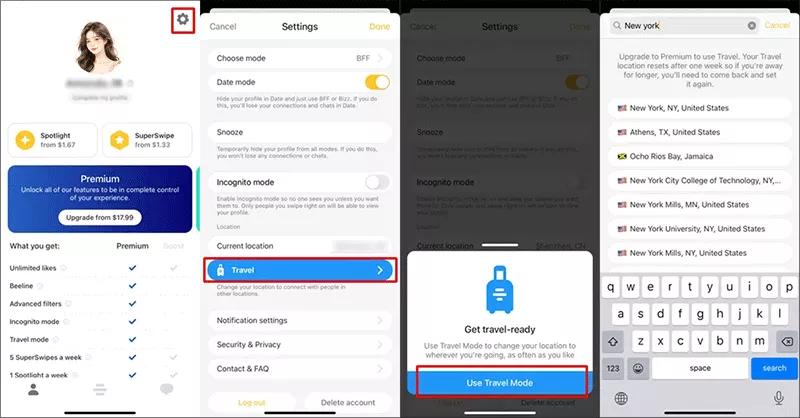
Follow these simple steps to change your Bumble location in Travel Mode.
Step 1: Launch the Bumble app on your smartphone.
Step 2: Tap the profile icon located at the bottom of the screen.
Step 3: Tap the gear icon in the upper corner to access settings.
Step 4: Scroll until you find Travel section in the location settings. Then tap Use Travel Mode to continue.
Step 5: Type the city or destination where you want to appear. Once activated, Bumble will show you profiles from that location. Your profile will also appear to other users in the selected city.
How to Change iPhone Location to Adjust Bumble Location
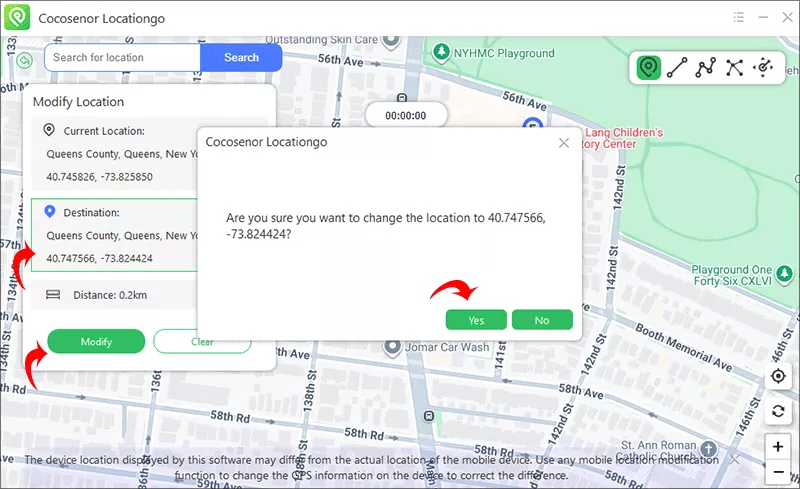
As is said before, the Bumble location relies on your phone’s GPS. Thus, you can change the phone’s GPS to make Bumble shows a new location on your profile. Is it easy to achieve it? Yes, you can change the iPhone location with Cocosenor Locationgo. Cocosenor Locationgo is the professional GPS location changer which can change your iPhone location in simple clicks. It is easy to use with no technical skills require.
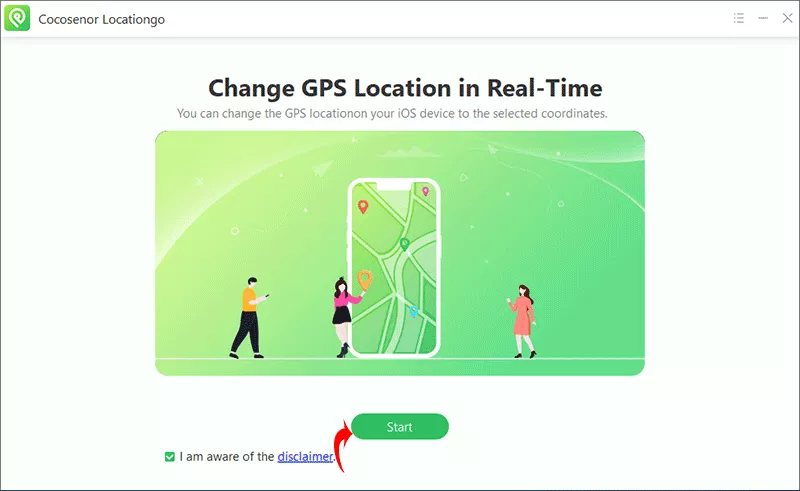
Step 1: Open Locationgo and hit the Start button. You should make sure the iPhone is connected to your computer.
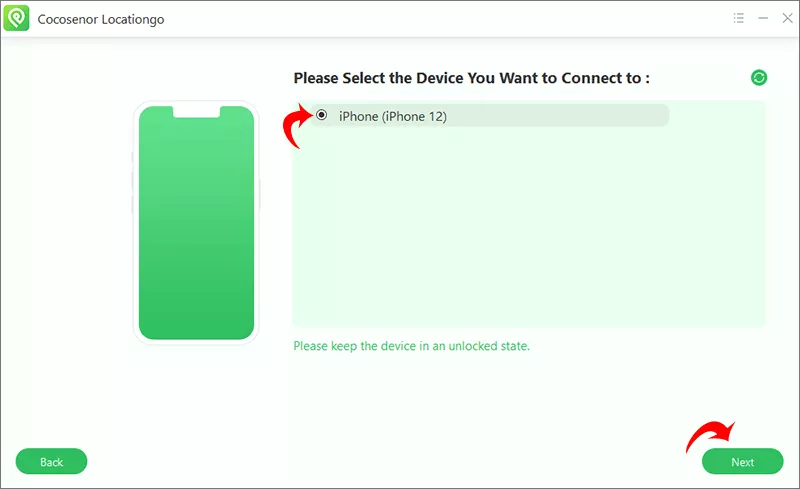
Step 2: Choose your iPhone from the menu. After that, hit the Next button to continue.
Step 3: Instantly, a map with your concise location appears. You can choose a new location by search, or directly selected from the Map. Finally, hit the Modify button to apply the change. And now you can open Bumble and check whether your location is changed or not.
FAQs on Bumble Location
1. Can I change my location on Bumble without paying?
Travel Mode is usually available with Bumble Premium, so it may require a subscription. If you use the third-party software to change your phone’s location, it always requires the payment.
2. Does Bumble show my exact location?
No. Bumble typically shows approximate distances, not exact addresses.
3. Will people know I’m using Travel Mode?
Yes. Bumble often displays a Travel Mode indicator on your profile.
Conclusion
Changing your location on Bumble is easy thanks to the built-in Travel Mode feature. Whether you’re planning a trip, relocating to a new city, or simply exploring new dating opportunities, adjusting your location can help you meet more people.
By understanding how Bumble’s location system works and using Travel Mode strategically, you can expand your match pool and make meaningful connections wherever you plan to go.



