


How to Convert HEIF to PNG Without Losing Quality
HEIF delivers high-quality photos with smaller sizes, which is widely used on Apple devices to save storage. But many apps, websites and picture tools can’t open HEIF files. If you want your images to work everywhere, turn HEIF into PNG instead.
In this guide, you'll learn what HEIF is, why people convert it to PNG, and several easy ways to complete the conversion without losing image quality.
- Contents:
- What Is a HEIF File?
- Why Convert HEIF to PNG?
- Method 1: Convert HEIF to PNG with Cocosenor HEIC Converter
- Method 2: Convert HEIF to PNG Using Quick Action on Mac
- HEIF vs PNG: Which Is Better?
- FAQs on HEIC to PNG
What Is a HEIF File?
HEIF stands for High Efficiency Image Format. Developed by the Moving Picture Experts Group (MPEG), it uses advanced compression technology to reduce file size while maintaining excellent image quality.
Many modern smartphones, especially iPhones, use HEIF as the default image format.
✅ Advantages of HEIF
- Smaller file sizes
- High image quality
- Supports image sequences
- Supports transparency
- Saves device storage space
❌ Disadvantages of HEIF
- Limited compatibility
- Some websites don't accept HEIF uploads
- Older image editors may not open HEIF files
- Sharing HEIF files can cause format issues
These limitations often lead users to convert HEIF images to PNG.
Why Convert HEIF to PNG?
PNG remains one of the most widely supported image formats. Converting HEIF to PNG offers several benefits:
- Better Compatibility: PNG files can be opened on virtually any operating system, browser, or image editor.
- Lossless Quality: PNG uses lossless compression, preserving image details during conversion.
- Transparency Support: PNG supports transparent backgrounds, making it ideal for graphic design and web development.
- Easier Sharing: Most websites and online services support PNG uploads without requiring additional conversion.
Method 1: Convert HEIF to PNG with Cocosenor HEIC Converter
If you need a fast and reliable solution, a dedicated converter is often the easiest option. No matter you are using Windows or Mac computer, or mobile phones (Android and iPhone), it is easy for you to change HEIF to PNG online with Cocosenor HEIF/HEIC Converter for free. Cocosenor HEIF Converter allows you to:
- • Convert HEIF/HEIC to PNG
- • Batch convert multiple images
- • Preserve original image quality
- • Maintain metadata when needed
Step 1: Open the browser and go to Cocosenor HEIF Converter website.
Step 2: Import your HEIF files and select PNG as the output format.
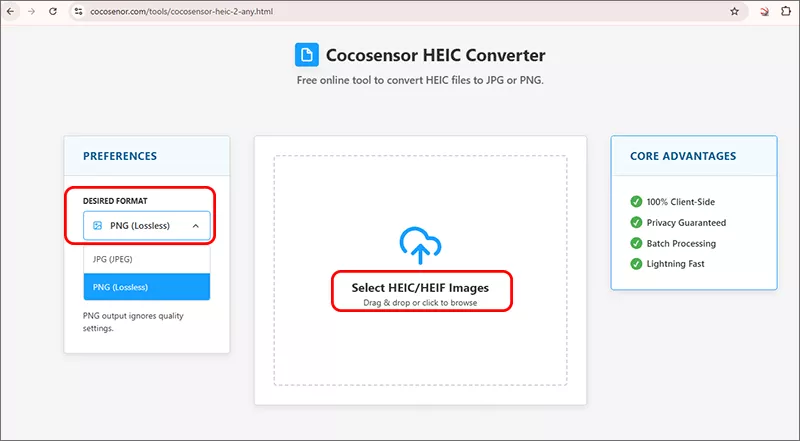
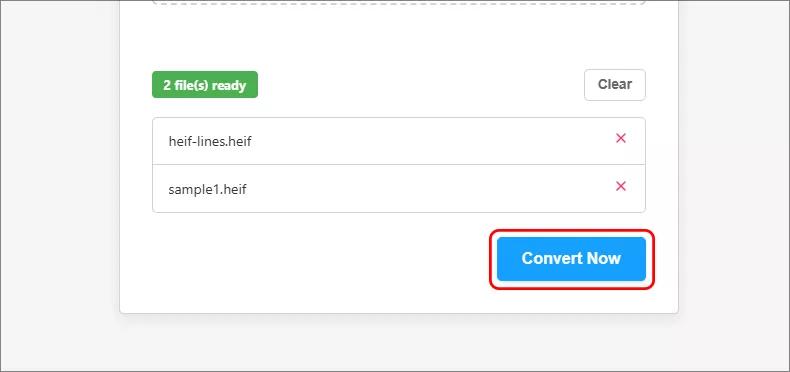
Step 3: Click Convert Now button to start the conversion.
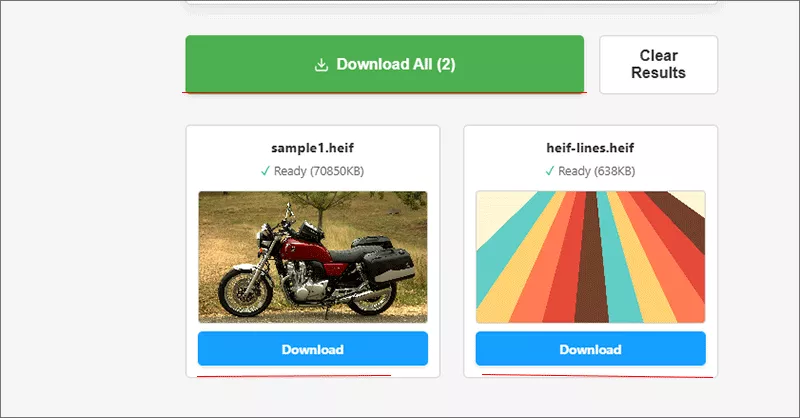
Step 4: Within seconds, your PNG files will be ready. Just click the Download button to save it on your device.
Method 2: Convert HEIF to PNG Using Quick Action on Mac
Mac users can convert HEIF images without installing additional software.
Step 1: Right-click the HEIF image and choose Quick Actions> Convert Image.
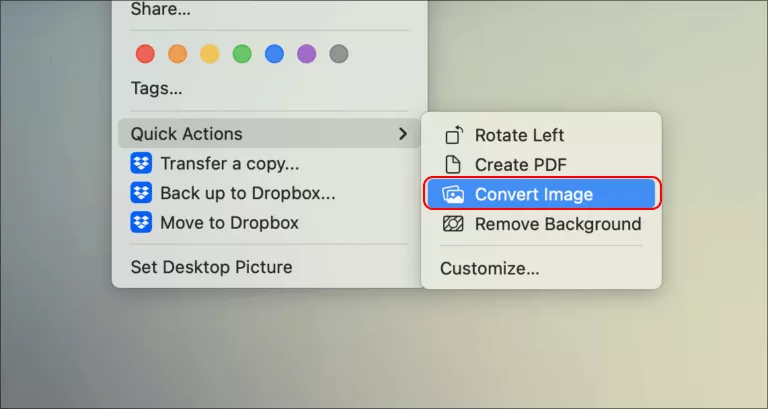
Step 2: Select PNG from the Format menu.
Step 3: Click Convert to PNG button to start the process. In seconds, the image will be exported as a PNG file.
HEIF vs PNG: Which Is Better?
The table below compares HEIF and PNG in terms of file size, image quality, transparency, compatibility, and web support.
| Feature | HEIF | PNG |
|---|---|---|
| File Size | Smaller | Larger |
| Image Quality | Excellent | Excellent |
| Transparency | Supported | Supported |
| Compatibility | Limited | Excellent |
| Web Support | Limited | Excellent |
HEIF is ideal for storage efficiency, while PNG is better for compatibility and editing.
FAQs on HEIC to PNG
Q1: Can I convert HEIF to PNG for free?
Yes. Many online converters and desktop tools provide free HEIF-to-PNG conversion options. For example, Cocosenor HEIC/HEIF Converter offers the HEIF to PNG converter online without limitations.
Q2: Will image quality decrease after converting HEIF to PNG?
PNG uses lossless compression, so image quality is generally preserved.
Q3: Can I batch convert HEIF files?
Yes. Dedicated HEIF conversion software supports batch processing. Cocosenor HEIF Converter also allows convert HEIF files in bulk.
The Bottom Line
HEIF is an efficient image format, but compatibility limitations can make PNG a better choice for editing, sharing, and uploading images. For users who frequently work with HEIF files, a dedicated conversion tool can save time while preserving the highest possible image quality.



