


How to Fake Your Location on Grindr
Location is a core feature of Grindr. The app uses your device’s GPS to show profiles nearby and help users connect with people in their area. However, many users sometimes want to view profiles in a different city, plan ahead for travel, or simply explore other communities.
In this guide, you’ll learn how location works on Grindr, the official ways to change or browse other locations, and tips to protect your privacy while using location-based dating apps.
- Contents:
- How Grindr Uses GPS Location
- Why People Want to Change Location on Grindr
- Can You Change Your Location on Grindr?
- Method 1: Change Grindr Location with Explore Feature
- Method 2: Update Your Device Location
- Method 3: Fake GPS Location on Grindr via Cocosenor Locationgo (Only for iPhone)
How Grindr Uses GPS Location
Grindr relies on your phone’s GPS and network signals to determine your approximate location. When you open the app, it checks your device location from your operating system—either Android or iOS—and then shows profiles sorted by distance.
The app displays users in a grid format, usually with the closest profiles appearing first. Instead of showing exact addresses, Grindr typically shows relative distances (for example: 500 meters away or 3 miles away).
This location-based system is designed to help users: Meet people nearby; Discover local LGBTQ+ communities; Connect quickly in real time. Because of this design, your location updates automatically when you move.
Why People Want to Change Location on Grindr
Many users want location flexibility for different reasons.
1. Planning Travel: People often explore cities they will visit soon. Viewing profiles ahead of time can help users connect with locals before arriving.
2. Discovering New Communities: Grindr has millions of users worldwide, so browsing other locations allows users to discover different LGBTQ+ scenes.
3. Expanding Social Circles: Sometimes people simply want to meet others outside their immediate area. Using official tools like Explore allows this without affecting your real device location.
Can You Change Your Location on Grindr?
Yes—but only through official features inside the app. Grindr offers a feature that allows users to browse profiles in other locations without physically being there. This feature is often called Explore and is available in certain premium plans. Instead of altering your GPS signal, the app simply lets you view another area virtually.
Method 1: Change Grindr Location with Explore Feature
If you’re planning a trip to Bangkok, London, or New York, you can explore profiles there before arriving. The easiest way to view profiles in another city is by using the Explore feature within Grindr. But you need to pay for the premium plan in Grindr.
Step 1: Open the Grindr app. Tap the Explore or location icon.
Step 2: Enter the city or area you want to view.
Step 3: Browse profiles from that location. Once selected, the grid will update to show users from the chosen city.
Method 2: Update Your Device Location
Your Grindr location automatically updates when your device location changes. If you travel to another area, the app will detect your new position and refresh the nearby grid.
To ensure this works properly:
On Android: Open Settings, tap Location, make sure Location Services are turned on and allow location access for Grindr.
On iPhone (iOS):Go to Settings, tap Privacy & Security, select Location Services, ensure Grindr is set to While Using the App.
When location access is enabled, the app will automatically show profiles near your current position.
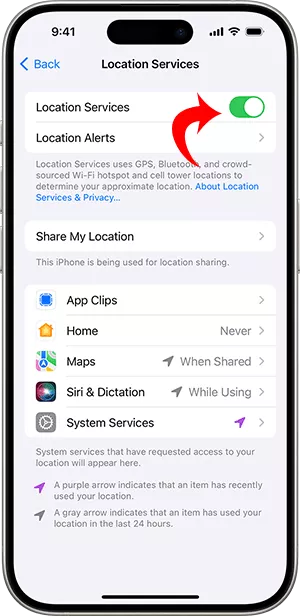
Method 3: Fake GPS Location on Grindr via Cocosenor Locationgo (Only for iPhone)
If you do not want to pay for Grindr, how can you change the Grindr location? The reliable GPS spoofer is your good helper. Why not try Cocosenor Locationgo. It is safe to hide your GPS location with a fake location at the system level. Let’s dive into the detailed steps.
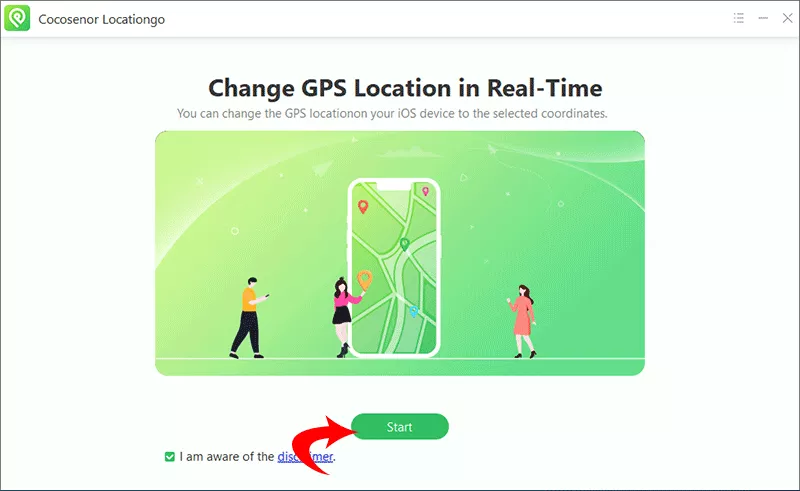
Step 1: Open Cocosenor Locationgo software and click the Start button. Then choose your iPhone to continue.
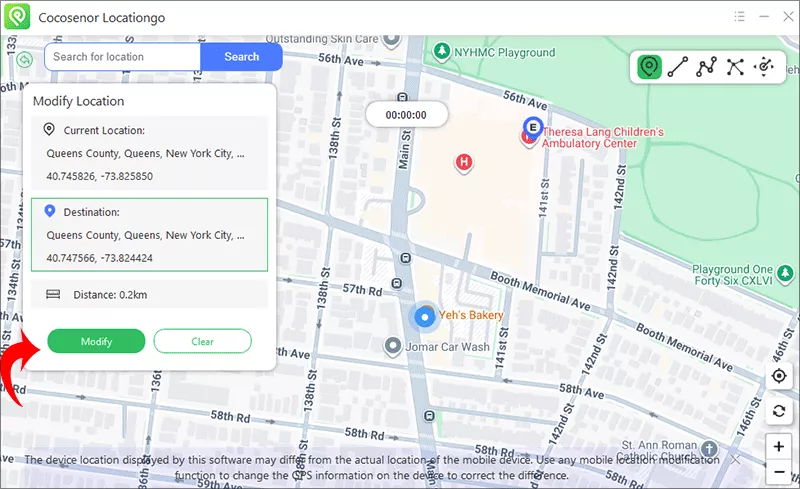
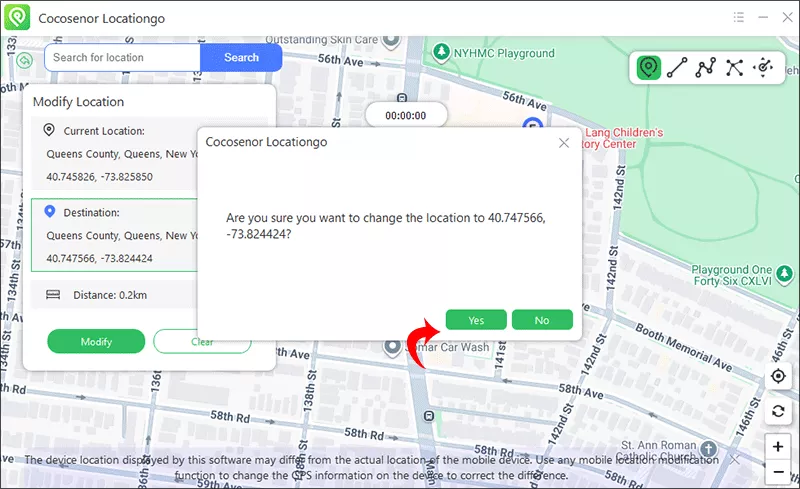
Step 2: Select a location on the map or input the location on the box, then click the Modify button.
Step 3: Hit the Yes on the pop-up box and your GPS location will be changed immediately.
Conclusion
Location is one of the main features that makes Grindr effective for connecting people nearby. While the app automatically uses your device GPS, it also offers official tools like Explore that allow users to browse other cities. If you want a fake GPS location on Grindr, Cocosenor Locationgo is a good choice to change the location and hide your real location in clicks.
If you want to view profiles in different locations, the best approach is to use built-in features and adjust your privacy settings rather than changing device GPS behavior.



